
If you’ve spent any time in ITSM, operations, or BPMN modeling, you’ve seen how quickly good intentions turn into chaos:
- A “simple” process map grows into 12 swimlanes
- Documentation gets mixed with tool steps and approvals
- Every team writes its own version
- Changing one screen in a tool breaks everything
People aren’t confused because they’re inexperienced. They’re confused because the architecture underneath the work is unclear.
That’s exactly what the USM method fixes.
This post explains—in the simplest possible terms—three ideas at the heart of USM:
actions → tasks → routines and how they combine into an architecture that keeps work clean, stable, and reusable.
I’ll also show how you do NOT need to rewrite all your documentation. Most organizations can adopt USM using what they already have.
1. Actions: The Smallest Unit of Work
In USM, everything begins with actions:
Action = one step that produces one outcome. e.g. “Assess request.” e.g. “Verify identity.” e.g. “Inform customer.”
These don’t depend on tools, teams, or domains. They’re the pure logic of service delivery.
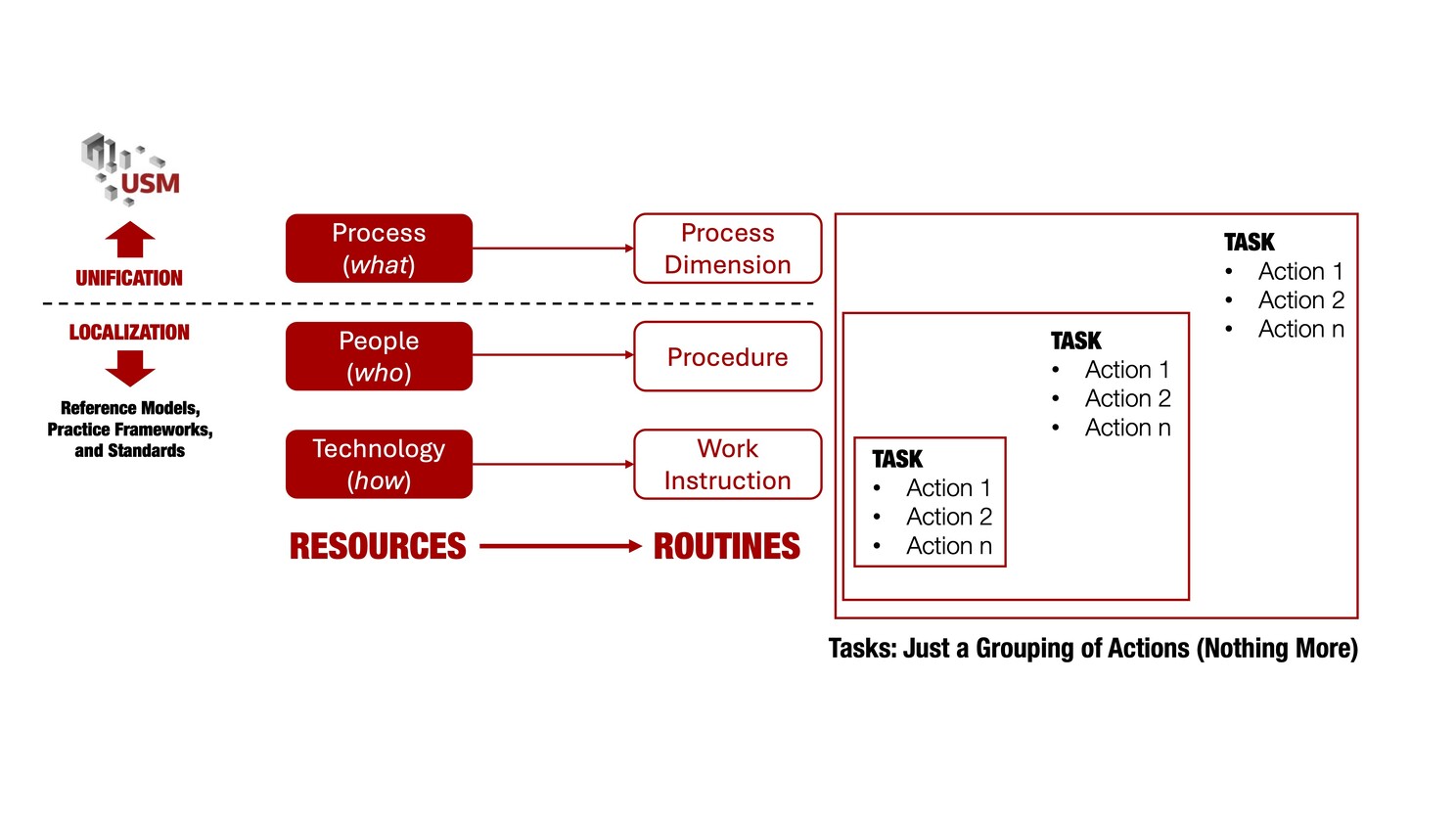
2. Tasks: Just a Grouping of Actions (Nothing More)
Here’s the part that clears up 20 years of confusion:
A task is NOT a process step. A task is any grouping of actions assigned to a single role or profile.
A task can be:
- one action
- three actions
- all actions assigned to a role
- or a small chunk created just to show a BPMN modeler “here’s your box.”
That’s all. A task is simply a container for actions.
3. The Three Types of USM Routines:
Process Dimension → Procedure → Work Instruction
This is the true architecture.
Instead of the usual “process → subprocess → work instruction,” the USM method uses dimensions to build routine types:
This creates stunning clarity:
- When a tool changes → only the work instruction changes
- When people reorganize → only the procedure changes
- The process dimension never changes
This is why USM routines are stable, future-proof, and reusable across all domains.
4. “Do We Have to Rewrite Everything?”
No — USM Works With What You Already Have
This is the best news for any CIO, Director, or Service Manager whose teams are drowning in process material.
You do not start over. You do not throw away documentation. You do not re-engineer everything.
USM simply helps you classify what you already have into the right layer.
Here’s how existing material maps:
Your Current Process Documents
→ usually a mix of logic + roles + tool steps → USM cleanly separates those pieces into their proper layers
Your Existing SOPs and KB Articles
→ almost always become work instructions (no rewriting required)
Your Swimlanes and RACIs
→ become procedures (maybe cleaned up, but already 80% there)
Tool workflows and automation rules
→ stay exactly where they are (they belong in work instructions)
Most organizations discover that 90% of what they need already exists—it just wasn’t structured.
5. How USM Tames BPMN Instead of Fighting It
BPMN wants to answer:
Who does what, in what order?
That’s great for communication. But BPMN is not a management system.
USM keeps the architecture clean underneath, then lets BPMN show a view of the work.
So in BPMN:
- a “task” often corresponds to one or more actions
- tasks are grouped simply for clarity
- the model remains true to the underlying USM workflow
- BPMN becomes an expression, not the blueprint
6. Two Quick Examples
Example A: Password Reset
- Process dimension (USM logic) RESTORE: Register → Assess → Restore → Close
- Procedure (who does what) Operator performs reset Operator informs customer
- Work instructions (technology) Depends on tool: ServiceNow, AD, Azure, etc.
No rewriting. Just clearer structure.
Example B: Employee Onboarding
Existing documentation usually includes:
- HR steps
- IT steps
- Facilities steps
- Tool how-tos
- Approval rules
- Checklists
USM reorganizes them:
- Process dimension: Register → Assess → Prepare → Activate → Inform
- Procedure: HR → IT → Facilities (roles + responsibilities)
- Work instructions: “How to create a Workday record” “How to provision access in Azure AD” “How to assign equipment”
Nothing is lost—everything becomes clearer.
7. Deployment: How USM Actually Rolls Out (Without Pain)
Here’s what a typical deployment looks like:
Phase 1 — Orientation (1–2 weeks)
Teams learn actions, tasks, routines, and the 5 USM processes.
Phase 2 — Inventory & Reclassification (2–4 weeks)
All existing documentation is sorted, not rewritten.
Phase 3 — Build One Pilot Service (hours, not weeks)
Clarity emerges fast.
Phase 4 — Expand to Other Services
Teams map one service at a time using existing material.
Phase 5 — Align Tools
Work instructions live in tools or KBs.
Phase 6 — Automate Where It Makes Sense
Because the architecture is clean.
8. Why This Matters to ITSM and BPM Professionals
USM provides a stable architecture that:
- stops documents from drifting
- prevents tools from dictating processes
- harmonizes teams
- eliminates rework
- handles both human work and automation cleanly
- scales across every domain of the enterprise
When done right:
USM makes organizations simpler, not smaller; clearer, not more controlled; and more consistent, not more bureaucratic.
==/== If you enjoyed John's post and it made you think about improving your own organization, please check out his USM Professional profile and his personal website, or better: contact John for a free consultation.
John has posted this blog earlier in his USM method News LinkedIN newsletter. If you want to read his posts when they're published - subscribe to John's channel.
9. Summary
- Actions are the atomic units of service delivery
- Tasks are just groupings of actions
- Routines come in three types:
- You don’t rewrite documentation—you sort it
- USM works perfectly with BPMN, ITIL, DevOps, and Lean
- The architecture stays clean even when tools, teams, or services change
USM is simple, powerful, and ready for organizations that want clarity without another massive process rewrite.
Thanks to the USM Professional Community for reviewing this article. And for anyone in the U.S. or beyond looking to simplify service delivery, streamline adoption, or introduce USM with minimal overhead, feel free to reach out—we're always happy to help!